Your secret key is in a NEXT_PUBLIC_ variable. Everyone can read it.
Last reviewed October 24, 2026 against the providers' current documentation.
The short version
Every variable whose name starts with NEXT_PUBLIC_ is written into your browser JavaScript when you run next build, so anyone visiting your site can read it. That's fine for values meant to be public, like a Supabase URL and publishable key or a Stripe pk_ key. A secret (OpenAI, Stripe sk_, a Supabase secret key, a database URL) has to lose the prefix and be used only in server code: a Server Component, a Route Handler or a Server Action. Then rotate the old key, because it has already been published.
Why it matters
Next.js's documentation explains the mechanism: to make a variable available in the browser, Next.js "inline[s] a value, at build time, into the js bundle that is delivered to the client", replacing every process.env.NEXT_PUBLIC_… with the hard-coded value, and "it will be inlined into any JavaScript sent to the browser." So the key sits in a file under /_next/static/ that every visitor downloads. Keeping .env out of git, or marking the variable as a Secret on your host, doesn't change that: the value is in the built JavaScript. Anyone who copies it can use it on your bill or against your data until you turn it off.
Fix it, in this order
Sort your NEXT_PUBLIC_ variables into public and secret
List everyNEXT_PUBLIC_variable in your.env*files and in your host's settings (on Vercel: Settings → Environment Variables). Values designed to be public can stay: a Supabase URL and anon orsb_publishable_key (with Row Level Security on), a Stripepk_key, a Firebase web config, an analytics ID. Anything the issuing service calls a secret, a private key, a password or a server key has to go. Also checknext.config.js: values in itsenvoption are always bundled, whatever their name.Rename each secret without the prefix
Next.js keeps variables withoutNEXT_PUBLIC_on the server, and its docs say a non-prefixed variable read in client code is replaced with an empty string. Rename, for example,NEXT_PUBLIC_OPENAI_API_KEYtoOPENAI_API_KEYin your.env.localand on your host. On Vercel, store it with the Secret type so it's write-only after saving.Use the secret only in server code
Move every call that needs the key into a Server Component, a Route Handler (app/api/…/route.ts) or a Server Action, and have your Client Components call that instead of the provider. Next.js recommends keepingprocess.envaccess in one server-only data module; addimport 'server-only'at the top of it, so importing it from a Client Component fails the build instead of quietly breaking.Protect the new server code
Next.js's docs warn that a Server Action is reachable by a direct POST request, and that a login check on the page doesn't cover the actions in it. Check the user inside every Route Handler and Server Action that uses the key, check they may act on that specific record, validate the input, rate-limit expensive calls, and return only what the page needs. Otherwise your endpoint becomes a free proxy to the paid API.Rotate every key that had the prefix
Removing the prefix and redeploying stops new copies, but the old JavaScript is already in browser caches, CDN caches and archives. Create a new key at the service that issued it, put it only in the server variable, redeploy (on Vercel, environment variable changes apply only to new deployments), then revoke the old key. See our guides for OpenAI, Stripe and Supabase keys.Check the build, then the live site
Runnext buildand search.next/staticfor the start of each secret (for examplesk_live_orsk-proj-). Nothing should match. After deploying, run the free check on your live site, which reads the same JavaScript files a visitor gets, including/_next/static/chunks.
Or ask your AI tool to do it
Paste this into Lovable, Bolt, Cursor, Claude Code or whichever tool built your app. Review what it changes before you deploy.
This is a Next.js app. List every environment variable that starts with NEXT_PUBLIC_ (in .env files, in next.config env, and in the code via process.env) and tell me for each one whether it is designed to be public (for example a Supabase URL and anon/publishable key, a Stripe pk_ key, a Firebase web config, an analytics ID) or a secret. For every secret: rename it without the NEXT_PUBLIC_ prefix, move every use of it into server code (a Server Component, a Route Handler or a Server Action) inside a module that starts with import 'server-only', and change the Client Components to call that server code. In every Route Handler and Server Action that uses a secret, verify the logged-in user and their permission on the specific record, validate the input, rate-limit it, and return only the fields the UI needs. Do not put secrets in next.config env. Make sure .gitignore covers .env*.local. Finally, list the keys I must rotate at each provider because they were already published.
How this happens
In a Next.js app, a component marked 'use client' can't read a normal environment variable, so the first time a key comes out empty in the browser, the quickest fix is to add NEXT_PUBLIC_. It works immediately, so nobody notices that the prefix is exactly what publishes the value. AI tools that generate Next.js apps, such as v0, and tutorials that call an API straight from the page make the same shortcut easy to take.
Check that it's really fixed
After you deploy, run the free check. It reads your live site the way an attacker would and tells you if any secret key is still visible.
Check my app freeTopic check: Exposed API key checker
Find the other leaks before someone else does
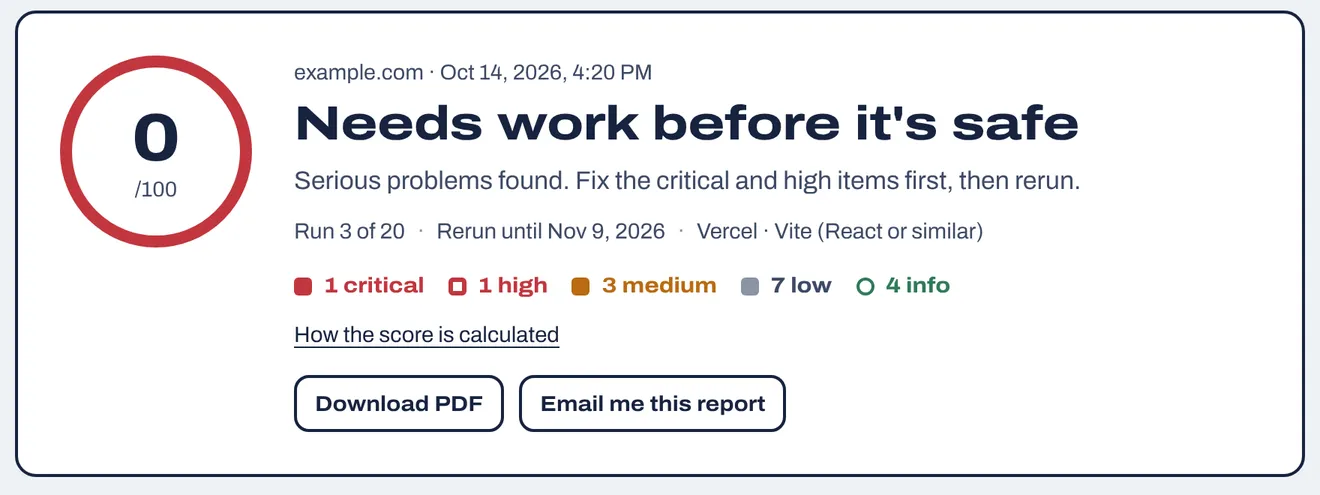
The free check reads your home page and its scripts. The website security report goes through up to 30 pages and 40 JavaScript files, plus .env and .git files, security headers, cookies and CORS, domain and email records, and libraries with known vulnerabilities. Every finding comes with the fix for your host and a prompt for your AI tool.
$19 once, including 20 runs over 30 days so you can fix things and check again.
Questions
Are NEXT_PUBLIC_ variables secret?
No. Next.js inlines them into the JavaScript sent to the browser at build time, so anyone can read them. They are also frozen at build time: changing the value later has no effect until you rebuild.
Can a Client Component read a variable without NEXT_PUBLIC_?
No. Next.js's docs say non-prefixed variables aren't included in the client bundle and are replaced with an empty string there. Read them in a Server Component, Route Handler or Server Action and pass only the result to the client.
Is it OK to keep my Supabase URL and anon key in NEXT_PUBLIC_ variables?
Yes. The Supabase URL and the anon or sb_publishable_ key are meant to be public, but only Row Level Security protects your tables. See Is the Supabase anon key safe?. Never put the service_role or sb_secret_ key in a NEXT_PUBLIC_ variable.
I marked the variable as Secret on Vercel. Isn't that enough?
No. Vercel's Secret type makes the value write-only in the dashboard and redacts it from build logs, but if the name starts with NEXT_PUBLIC_, Next.js still writes the value into your browser JavaScript during the build.
Does passing a secret as a prop from a Server Component keep it hidden?
No. Props passed to a Client Component are sent to the browser. Next.js suggests a server-only data layer that returns only safe fields, and offers React's experimental taint APIs as an extra guard, not a replacement.
Does this apply to Vite and other frameworks?
Yes, with a different prefix: Vite bundles VITE_ variables (see secrets in VITE_ variables), Expo bundles EXPO_PUBLIC_ ones. Treat any variable with a public prefix as published.
Can your free check see my NEXT_PUBLIC_ variables?
It can't see variable names, because Next.js replaces them with their values at build time. It reads your public JavaScript, including /_next/static/ chunks, and flags values that look like secret keys (OpenAI, Anthropic, Stripe, Supabase secret, AWS, GitHub, database URLs with passwords and others). It's passive, so it never tries to use a key it finds.
Sources
- Next.js: How to use environment variables (App Router)
- Next.js: Server and Client Components (Preventing environment poisoning)
- Next.js: How to think about data security
- Next.js: next.config.js env option
- Vercel: Environment variables
- Vercel: Config and Secret environment variables