Paste your site's address. In about 20 seconds you'll see what any visitor can already find: secret keys in your JavaScript, downloadable config files, readable source code and missing security headers.
Passive and read-only. Works with any public site, including apps built with Lovable, Bolt, v0, Replit, Cursor, Windsurf and Claude Code.
AppInspected
Site
Waiting for your address
Checked
–
Critical issues
–
Not checked yet
Your result fills in this tag. Nothing is stored.
Results
The free check can't see these
They need a deeper look at your database rules or code. The website security report covers more of them.
Most "website security checkers" answer one of two questions: is this site infected or blacklisted?, or is this site safe for me to visit? This check answers a third one, for the people who run the site: what does my site hand to every visitor that it shouldn't? That's where the expensive mistakes are: a payment key in the JavaScript, a config file left in the deploy folder, a database key that skips every rule.
Secret API keys in your JavaScript
Stripe secret and restricted keys, OpenAI and Anthropic keys, AWS access keys, GitHub and Slack tokens, SendGrid, Resend and Twilio keys, private keys and database URLs with a password, in your page and up to 25 of its own JavaScript files.
Database master keys
A Supabase service_role key or sb_secret_ key in the browser. Either one skips every Row Level Security rule.
Downloadable .env and .git
We request /.env and /.git/HEAD and flag them only if they return real contents, not your app's normal fallback page.
Public source maps
If your JavaScript points to a .map file and it downloads, anyone can read your original, commented source code.
HTTPS and security headers
HTTPS itself, plus Strict-Transport-Security, Content-Security-Policy, framing protection (X-Frame-Options or frame-ancestors) and X-Content-Type-Options.
Keys that are meant to be public
Supabase anon and publishable keys, Firebase web keys and Stripe publishable keys are marked Fine, so you don't rotate a key that was never a problem.
How the check works
It's a passive scan. We load your page the way a browser does, read up to 25 JavaScript files from your own domain (including the code chunks those files load), and make a few ordinary requests: /.env, /.git/HEAD and the source map your code points to. That's it. We never log in, never submit a form, never send attack payloads and never use a key we find.
Each finding gets a severity you can act on:
Critical: a working secret or a downloadable file that hands out secrets. Fix it today, starting with rotating the key.
High: no HTTPS, a Stripe test-mode secret key, a Slack token, a Twilio key or a random-looking value in a field named like a secret.
Medium: public source maps, or a Google API key that isn't part of a Firebase config (check that it's restricted).
Low: a missing security header. Worth fixing, but nothing is leaking.
Fine: keys designed to be public, listed so you know we saw them.
The verdict is Fix before launch if anything is critical, Needs attention if anything is high, and No critical issues found otherwise. Results aren't stored, and any key we show is cut down to its first and last few characters.
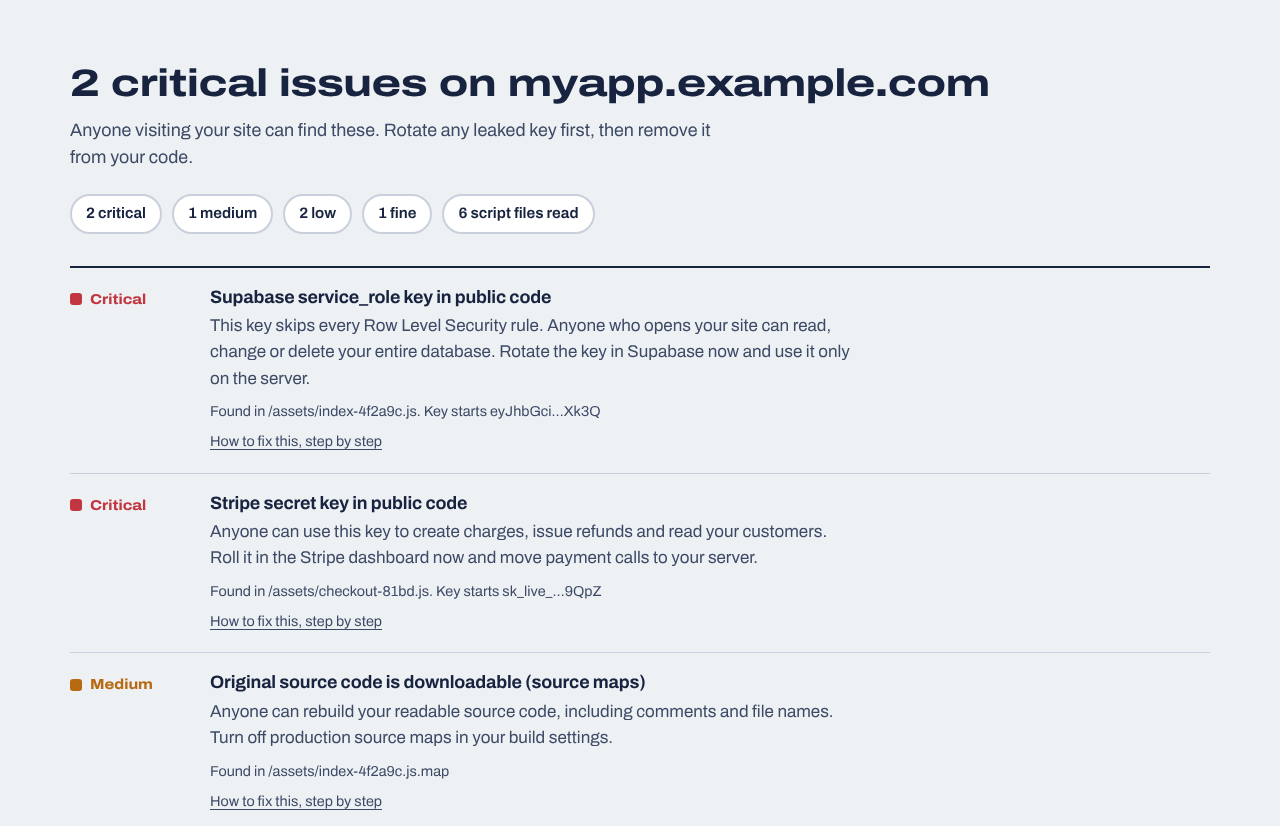
Example result
An example result for a made-up app. Every finding links to a step-by-step fix guide.
What a free website scan can't tell you
A clean result is a good sign, not a guarantee. Here is what this check doesn't do, so you know where to look next:
It isn't a penetration test. We don't try SQL injection, cross-site scripting or logins with guessed passwords. Those tests send attack traffic and need your written permission; a human tester or an active scanner does them.
It doesn't look for malware or blacklisting. If you think your site was hacked and is serving spam or malware, use a malware scanner and check Google Search Console's Security issues report.
It can't see your database rules or server code. A Supabase table without Row Level Security or Firestore rules left in test mode look fine from outside until someone tries them.
It reads one page. We start from the address you enter and the scripts it loads. Pages and code that only load after login may not be covered.
Free check, website report and penetration test compared
Free check
$19 website report
Penetration test
Secret keys and exposed files
Home page and its scripts
Up to 30 pages and 40 scripts, plus 24 forgotten-file paths
Whatever needed the secret key (payments, AI requests, admin database access) belongs in a server function: an API route, an Edge Function or a serverless function. Read the key from a server-only environment variable, never one starting with VITE_, NEXT_PUBLIC_, REACT_APP_ or EXPO_PUBLIC_.
Copy the config for your host from our security headers check page. Missing headers are hardening, so do them after any leaked key.
Run the check again
Deploy, then paste the same address above. A clean result means none of these problems is visible from outside any more.
When you need more than a free check
If the free check is clean and you want to know what's behind the home page, or you'd like to hear about it the day something changes, these are the next steps.
Website security report
$19 one time
For any website you own: a read-only review of up to 30 pages and 40 JavaScript files (found through your build manifest, routes and sitemap), app logic in the browser (admin and paid-feature checks, prices sent from the browser, AI APIs called directly), headers, cookies and CORS, domain and email records, libraries with known vulnerabilities, forgotten files and third-party scripts, with fixes written for your host. Optional database tests for Supabase or Firebase. Requires proof you own the site.
We repeat the outside checks every day and email you when something changes: a new key in your JavaScript, a removed header, a new third-party script, a certificate about to expire. Includes a live badge and one full website report every 30 days.
Start with the things anyone can see from outside: run a passive check like the one above for exposed keys, files and headers, and make sure your site redirects to HTTPS. Then check what can't be seen from outside: your database rules, the login checks on your API routes, and your dependencies. No single scan proves a site is secure.
Is it safe to run a security scan on my website?
This one is. It makes the same kind of requests a browser makes, plus a handful of ordinary GET requests for well-known files, and it never logs in, writes data or sends attack payloads. Active vulnerability scanners are different: they send attack traffic, which can create junk data or trip your firewall, so only run those on sites you own.
Will this find all vulnerabilities on my website?
No. It finds a specific set of high-impact mistakes that are visible from outside: leaked secret keys, downloadable .env and .git files, public source maps, and missing HTTPS and security headers. It doesn't test for SQL injection, cross-site scripting or broken access control.
What's the difference between a vulnerability scan and a penetration test?
A scan runs a fixed list of automated checks. A penetration test is a person (often with tools) actively trying to break in, which finds logic flaws a scanner can't, takes days and costs thousands. Run a scan first so you're not paying a tester to find a leaked key.
Does the check look for malware or blacklisting?
No. It checks what your site exposes, not whether it has been infected. For malware, use a malware scanner and check the Security issues report in Google Search Console.
Can I check a website I don't own?
The free check only reads public information, the same as visiting the site, so it works on any public address. The website security report goes further and requires proof that you own the site before it runs.
How often should I check my website's security?
After every deploy that touches configuration, keys or the build setup, and at least once before launch. If your site changes often, daily monitoring repeats the outside checks every day and emails you when something new appears.