Paste your lovable.app address or your custom domain. We read your published app the way a stranger would and flag secret keys, a Supabase service_role key, exposed files and missing headers. Free, no sign-up.
Passive and read-only. Works with any public site, including apps built with Lovable, Bolt, v0, Replit, Cursor, Windsurf and Claude Code.
AppInspected
App
Waiting for your address
Checked
–
Critical issues
–
Not checked yet
Your result fills in this tag. Nothing is stored.
Results
The free check can't see these
They need a deeper look at your database rules or code. The website security report covers more of them.
Lovable has security checks built in. According to its documentation, a Quick scan runs when you open the publish dialog and reviews your database access rules, critical dependency vulnerabilities and unauthenticated MCP servers, and a Deep scan you run yourself reviews the app's code for access control, leaked secrets, payments and more. Lovable is also clear that these tools "cannot guarantee complete security". Use them.
This check does something different: it looks at the published app from the outside, exactly as a visitor's browser receives it. That catches things an inside scan can miss or that happen after it ran:
code you edited outside Lovable, in GitHub, Cursor or another editor, and deployed;
an export you host yourself on Netlify, Vercel or your own server, with that host's build settings and headers;
a key typed straight into code or into a VITE_ variable instead of Lovable's Secrets;
what a custom domain actually serves today.
What we check on a Lovable app
Lovable builds React apps with Vite, and most of them talk to a Supabase backend directly from the browser. So the JavaScript bundle is where the keys are, and that's what we read.
Supabase service_role or secret key
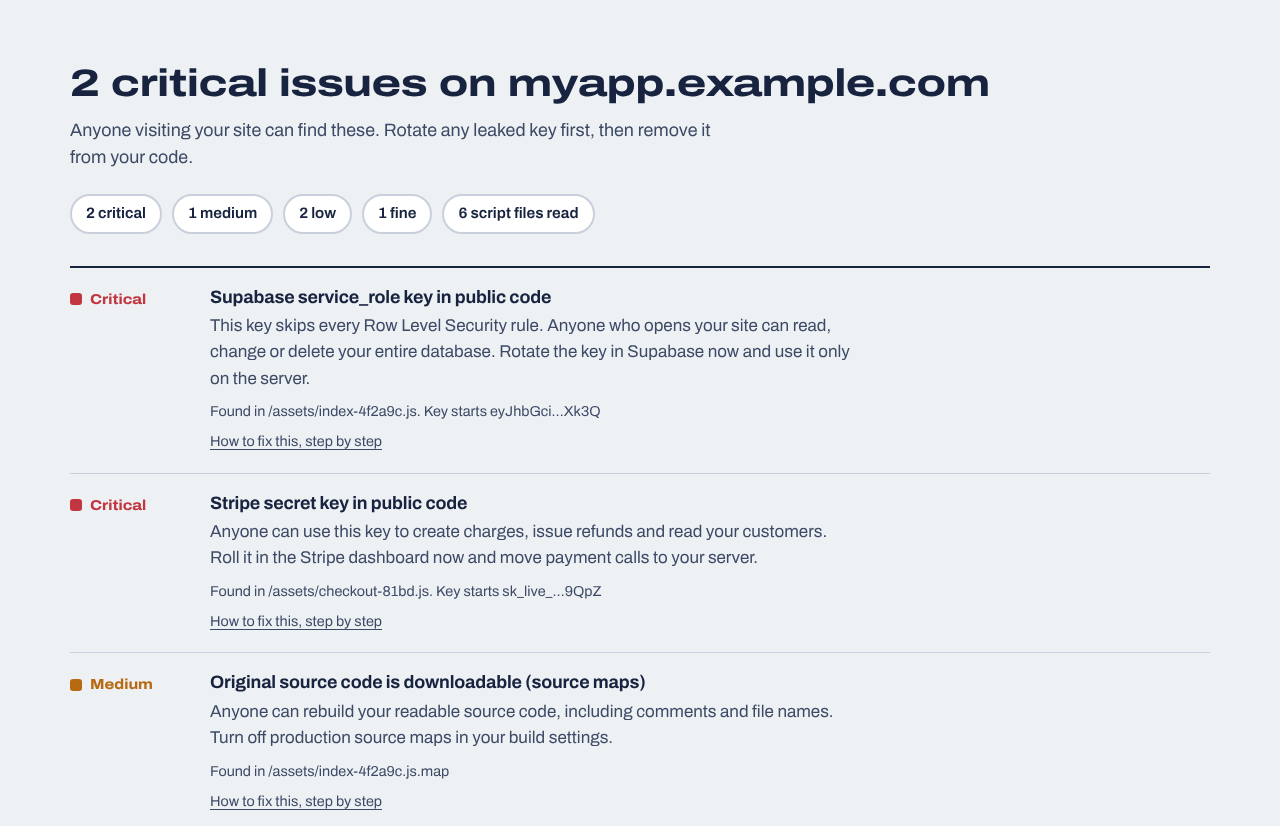
Critical. This key skips Row Level Security, so anyone who copies it can read, change or delete your whole database. It sometimes appears after the AI swaps keys to get past a permissions error.
Supabase anon or publishable key
Expected, and marked fine. It's safe only when Row Level Security is on for every table, which we can't see from outside.
AI and payment keys
OpenAI, Anthropic, Stripe secret, Resend, SendGrid and other keys that belong in a Supabase Edge Function, not in the page.
Exposed files
/.env and /.git/HEAD. Rare on Lovable's own hosting, common when an export is deployed from the project folder.
Source maps
Vite turns them off for production by default, but a debugging change can turn them back on.
HTTPS and security headers
HSTS, Content-Security-Policy, framing protection and X-Content-Type-Options.
The Lovable security issue people ask about
In 2025, a researcher reported that many Lovable-generated apps had Supabase tables without proper Row Level Security, so anyone with the app's public key could read or write their data. It was published as CVE-2025-48757, describing insufficient Row Level Security in Lovable-generated sites through April 15, 2025; Lovable disputes it, on the basis that each customer is responsible for protecting their own app's data. Either way, the lesson for every Lovable app is the same: the public key is fine, the database rules are what protect you.
Our free check can't test those rules, because it only reads what a browser can see. It does tell you if the far worse key, the service_role key, is in your app. To test the rules themselves, the website security report has optional Supabase database tests that use your own test accounts.
Example result
A made-up Lovable-style app with a service_role key in its bundle. The guide link explains how to replace it without downtime.
Your Lovable security checklist
Turn on RLS for every table
In Supabase, open the Security Advisor, fix every table with RLS disabled, and write one policy per operation. Guide: Supabase RLS disabled.
A new feature can bring a key back. Paste your address above after you publish, or turn on daily monitoring.
Or ask Lovable to do it
Paste this into Lovable's chat. Review what it changes before you publish.
Do a security review of this app before I publish, and report back before changing anything. 1) List every API key or secret used in frontend code or in VITE_ variables, and say which are meant to be public (Supabase anon/publishable key) and which must move to a Supabase Edge Function with the key stored as a secret. 2) List every Supabase table with its Row Level Security status and policies, and propose policies so each user can only read and change their own rows. 3) Make sure the Supabase service_role key is never used in the browser. 4) Make sure production source maps are off in vite.config. Then fix the items I approve, one at a time.
After launch
Website security report
$19 one time
For any website you own: a read-only review of up to 30 pages and 40 JavaScript files (found through your build manifest, routes and sitemap), app logic in the browser (admin and paid-feature checks, prices sent from the browser, AI APIs called directly), headers, cookies and CORS, domain and email records, libraries with known vulnerabilities, forgotten files and third-party scripts, with fixes written for your host. Optional database tests for Supabase or Firebase. Requires proof you own the site.
We repeat the outside checks every day and email you when something changes: a new key in your JavaScript, a removed header, a new third-party script, a certificate about to expire. Includes a live badge and one full website report every 30 days.
Lovable's platform has its own security features, including scans before publishing. Whether your app is secure depends on choices made while building it: where keys live and how your Supabase tables are protected. Those are the parts to check.
Is it a problem that my Supabase anon key is visible in my Lovable app?
No, it's designed to be public. It's safe as long as Row Level Security is turned on for every table with a policy that limits what each user can see. The service_role key is the one that must never be in the app.
Does Lovable's Security Scan replace this check?
They complement each other. Lovable's scans look at your project from the inside; this check looks at what your published app actually serves, including custom domains, self-hosted exports and changes made outside Lovable.
Can people see my Lovable app's code?
They can see all of its frontend code, because the browser needs it to run your app. That's normal. It's why secret keys can't be in that code, and why public source maps (which make it fully readable) should stay off.
How do I add security headers to a Lovable app?
It depends on where it's hosted. If you host an export on Netlify, Vercel or Cloudflare Pages, copy the config from our security headers check. On Lovable's own hosting, check Lovable's documentation; with a custom domain you can also add headers through a proxy such as Cloudflare.
Does it work on a custom domain?
Yes. Paste whatever address your users visit: a lovable.app subdomain or your own domain.