Paste your bolt.host address or your own domain. We read the published app the way a stranger would and flag secret keys in the JavaScript, exposed files and missing headers. Free, about 20 seconds.
Passive and read-only. Works with any public site, including apps built with Lovable, Bolt, v0, Replit, Cursor, Windsurf and Claude Code.
AppInspected
App
Waiting for your address
Checked
–
Critical issues
–
Not checked yet
Your result fills in this tag. Nothing is stored.
Results
The free check can't see these
They need a deeper look at your database rules or code. The website security report covers more of them.
Bolt has its own checks. Its documentation says that on paid plans you can choose Run security audit from the Publish menu before publishing, and Bolt fixes the issues it finds; on any plan, the database's Security tab shows its security status. Use both.
This check works from the other side: it reads the published app at its public address, the same way any visitor's browser does. That's useful when:
you're on a plan without the audit, or published without running it;
you exported the code and deployed it elsewhere (Netlify, Vercel, your own server), where build settings and headers are different;
a later prompt or a manual edit added a key to the frontend after the audit ran;
you want a second, independent opinion before launch.
What we check on a Bolt app
Bolt sites are published to an address ending in bolt.host or to your own domain, and use either Bolt's own database or a Supabase project. Either way, what the browser downloads is what we read.
Secret keys in the frontend
Stripe secret keys, OpenAI and Anthropic keys, email-service keys and other secrets that belong in a server function, found in your page and its JavaScript.
Supabase keys
If your Bolt app uses Supabase, we decode its keys: the anon or publishable key is fine; a service_role or sb_secret_ key is critical.
Exposed .env and .git
Mostly a risk for exported projects deployed from the project folder.
Source maps
Whether your bundle's source map can be downloaded, which makes the whole frontend readable.
HTTPS and security headers
HSTS, Content-Security-Policy, framing protection and X-Content-Type-Options.
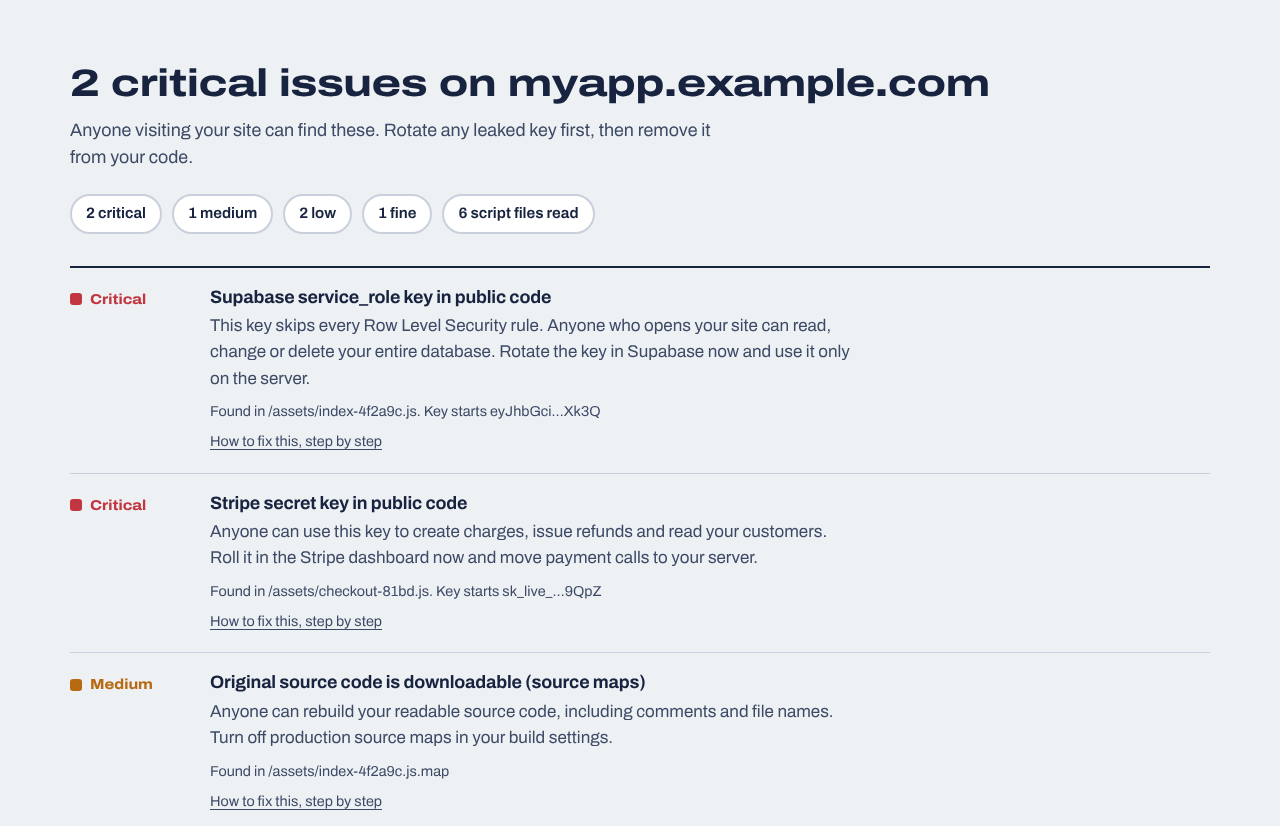
Example result
A made-up app with secret keys in its JavaScript. Every finding links to a fix you can paste into Bolt.
Where keys should live in a Bolt app
The most common Bolt security problem is the same as with every AI builder: a key that should be on a server ends up in the browser. Bolt's documentation describes server functions as the way to connect a project to external services, with secrets stored separately from your code. If your app uses Supabase instead, Supabase Edge Functions and Supabase secrets do the same job.
Find where each key is used
Ask Bolt to list every API key the frontend uses and whether it's meant to be public. Stripe publishable keys and the Supabase anon key are; everything else isn't.
If our check found it, someone else can find it too. Create a new key, deploy, then revoke the old one.
Lock down the database
For Supabase, every table needs Row Level Security with sensible policies: Supabase RLS disabled. For Bolt's own database, review its Security tab.
Recheck after publishing
Paste your address above after each publish that touches keys or settings.
Or ask Bolt to do it
Before I publish, review this project's security and report back before changing anything. 1) List every API key or secret referenced in frontend code or in VITE_ variables and say which are meant to be public. 2) Move every call that uses a secret key (payments, AI APIs, email) into a server function that reads the key from project secrets, and make the frontend call that function. 3) If the app uses Supabase, list each table with its Row Level Security status and propose policies so users can only access their own rows. 4) Make sure production source maps are off. Then apply the changes I approve.
What this check can't see
It doesn't see your database rules, your server functions' code or whether they check who is logged in, and it doesn't try to break in. A clean result means none of the problems we check for is visible from outside; it isn't a full audit. The website security report reads much more of your app (up to 40 scripts across 30 pages, admin and paywall checks in the browser, prices sent to checkout) and can test Supabase rules with your own test accounts.
Website security report
$19 one time
For any website you own: a read-only review of up to 30 pages and 40 JavaScript files (found through your build manifest, routes and sitemap), app logic in the browser (admin and paid-feature checks, prices sent from the browser, AI APIs called directly), headers, cookies and CORS, domain and email records, libraries with known vulnerabilities, forgotten files and third-party scripts, with fixes written for your host. Optional database tests for Supabase or Firebase. Requires proof you own the site.
We repeat the outside checks every day and email you when something changes: a new key in your JavaScript, a removed header, a new third-party script, a certificate about to expire. Includes a live badge and one full website report every 30 days.
Bolt can build production apps, and it includes a security audit on paid plans. Whether your app is safe depends on how it handles keys and database access, so check those before real users and real data arrive.
Does Bolt's security audit replace this check?
They complement each other. Bolt's audit reviews your project before publishing; this check reads what the published site actually serves, including exported deployments and later edits.
Can people see my Bolt app's code?
Yes, all of the frontend code, because the browser has to download it to run your app. That's normal; it just means no secret key can be in it.
Where should API keys go in a Bolt app?
In a server function with the key stored as a project secret, or in a Supabase Edge Function if you use Supabase. Never in frontend code or a VITE_ variable.
Does it work on bolt.host addresses?
Yes. Paste the bolt.host address or the custom domain your users visit.
Does the check test my Bolt database rules?
No. The free check can't see database rules from outside. Use the Security tab of your Bolt database; for Supabase, the website security report can add Row Level Security tests.