Security headers check, with the fix for your host
See which HTTP security headers your site sends, what each one protects against, and copy the config for Vercel, Netlify, Cloudflare, Firebase Hosting, AWS Amplify, nginx or Apache.
Passive and read-only. Works with any public site, including apps built with Lovable, Bolt, v0, Replit, Cursor, Windsurf and Claude Code.
AppInspected
Site
Waiting for your address
Checked
–
Critical issues
–
Not checked yet
Your result fills in this tag. Nothing is stored.
Results
The free check can't see these
They need a deeper look at your database rules or code. The website security report covers more of them.
The check above looks at the response headers of your home page, along with secret keys and exposed files (a missing header matters much less than a leaked key, so we look at both). For headers it reports:
HTTPS
Whether your page is served over https:// at all. Missing HTTPS is rated high.
Strict-Transport-Security (HSTS)
Tells browsers to always use HTTPS for your site, so a returning visitor never tries the insecure version first.
Content-Security-Policy (CSP)
Limits where scripts and other resources can load from, which reduces the damage of an injected script.
Framing protection
X-Frame-Options or the CSP frame-ancestors directive, which stop other sites from showing your pages in a frame to trick people into clicking.
X-Content-Type-Options
Set to nosniff so browsers don't guess file types and run something as a script that wasn't meant to be one.
Each missing header is rated low: it's hardening, not a leak. The $19 website security report grades them properly: HSTS max-age of at least six months and includeSubDomains, CSP quality ('unsafe-inline' without nonces, 'unsafe-eval', wildcard script sources, report-only), Referrer-Policy, server version disclosure, CORS, cookie flags, mixed content and the http-to-https redirect, and builds a starting CSP from what your site actually loads.
What each security header does
Strict-Transport-Security
Recommended: max-age=63072000; includeSubDomains (two years). Only add includeSubDomains once every subdomain works over HTTPS, because browsers will refuse plain HTTP on all of them.
Content-Security-Policy
A good start for a simple site: default-src 'self'; script-src 'self'; object-src 'none'; base-uri 'self'; frame-ancestors 'self', plus the domains your app really loads scripts from (analytics, payments, your backend). Send it as Content-Security-Policy-Report-Only first: it blocks nothing and reports what it would block in the browser console. When the reports are clean, rename it to Content-Security-Policy.
X-Frame-Options and frame-ancestors
X-Frame-Options: SAMEORIGIN (or DENY if you never frame your own pages) is the older header. CSP's frame-ancestors is the modern replacement; sending both is fine as long as they agree.
X-Content-Type-Options
Always nosniff. There is no other value, and it rarely breaks anything.
Referrer-Policy
strict-origin-when-cross-origin sends only your domain, not the full address, to other sites. Modern browsers default to it, but setting it explicitly keeps older browsers in line. The free check doesn't grade it; the report does.
Permissions-Policy
Turns off browser features you don't use, for example camera=(), microphone=(), geolocation=(). Useful, optional, and not graded by either check.
Add them on your host
These are the same snippets our report gives when it detects your host. They add every header above in one change, with the CSP in report-only mode so nothing breaks. Open your host, copy the config, and adjust the CSP once you've seen its reports.
<IfModule mod_headers.c>
  Header always set Strict-Transport-Security "max-age=63072000; includeSubDomains"
  Header always set Content-Security-Policy-Report-Only "default-src 'self'; script-src 'self'; object-src 'none'; base-uri 'self'; frame-ancestors 'self'"
  Header always set X-Frame-Options "SAMEORIGIN"
  Header always set X-Content-Type-Options "nosniff"
  Header always set Referrer-Policy "strict-origin-when-cross-origin"
</IfModule>
Cloudflare
a proxy in front of any host
In the Cloudflare dashboard, open Rules, then Transform Rules, and create a "Modify Response Header" rule that sets each header above for your hostname.
Hosts that don't let you set headers
GitHub Pages, Shopify, Wix, Squarespace and Webflow don't let you set custom security headers. If it matters, put a proxy such as Cloudflare in front of your domain and add them there (Rules, then Transform Rules, then a "Modify Response Header" rule), or accept it as a limit of the platform. On app builders with their own hosting (Lovable, Replit and others), check the platform's documentation; the same proxy approach works with a custom domain.
Common mistakes
Enforcing a CSP on day one. A strict policy that blocks your analytics or payment script breaks the site. Report-only first.
Setting headers in a meta tag.<meta http-equiv> can't set HSTS, X-Frame-Options or frame-ancestors. They must be real response headers.
HSTS with includeSubDomains too early. An old subdomain without HTTPS stops working for everyone who has visited your main site.
Headers on HTML only. Most host configs above apply to every path, which is what you want; custom server code often forgets error pages and static files.
Example result
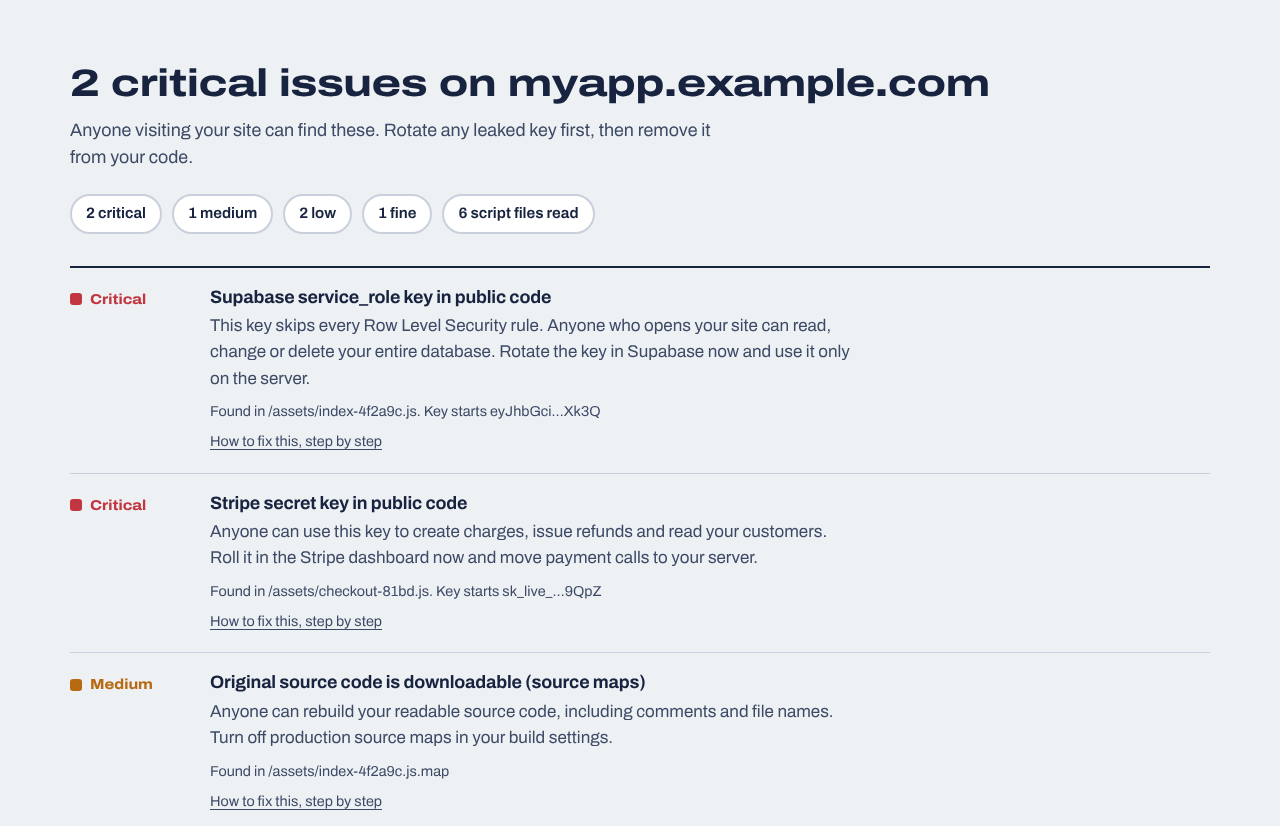
Missing headers are listed as Low, below any leaked keys or exposed files (this example shows the top of the list).
After the headers
Headers are the easy, visible part. If you want every header graded, cookies and CORS checked and the next change caught automatically:
Website security report
$19 one time
For any website you own: a read-only review of up to 30 pages and 40 JavaScript files (found through your build manifest, routes and sitemap), app logic in the browser (admin and paid-feature checks, prices sent from the browser, AI APIs called directly), headers, cookies and CORS, domain and email records, libraries with known vulnerabilities, forgotten files and third-party scripts, with fixes written for your host. Optional database tests for Supabase or Firebase. Requires proof you own the site.
We repeat the outside checks every day and email you when something changes: a new key in your JavaScript, a removed header, a new third-party script, a certificate about to expire. Includes a live badge and one full website report every 30 days.
Instructions your server sends with each page that tell the browser to turn on extra protections: always use HTTPS, only run scripts from approved places, don't let other sites frame the page, and don't guess file types.
Which security headers should every website have?
At a minimum: Strict-Transport-Security, a Content-Security-Policy, framing protection (X-Frame-Options or CSP frame-ancestors) and X-Content-Type-Options: nosniff. Referrer-Policy and Permissions-Policy are good additions.
Do security headers affect SEO?
HTTPS is a lightweight Google ranking signal; the other security headers aren't documented as ranking factors. They protect your visitors, which is reason enough.
Will adding a Content Security Policy break my site?
It can, if the policy blocks a script your site needs. That's why we suggest starting with Content-Security-Policy-Report-Only, which only reports, then switching to an enforced policy once the reports are clean.
Is X-Frame-Options deprecated?
CSP frame-ancestors is the modern replacement and takes priority in browsers that support it, but X-Frame-Options is still widely supported and harmless to keep. Send both, with matching settings.
Can I set security headers in a meta tag?
Only part of a Content-Security-Policy. HSTS, X-Frame-Options and the frame-ancestors directive are ignored in meta tags, so set them as response headers in your host's config.
How can I check security headers myself?
Run curl -I https://yoursite.com in a terminal, or open the browser's developer tools, reload, click the page in the Network tab and look at the Response Headers.