Vibe coding security check: scan the app your AI built
Whatever wrote the code, the leaks look the same from outside. Paste your app's address and see which secret keys, config files and missing protections a stranger can already see.
Passive and read-only. Works with any public site, including apps built with Lovable, Bolt, v0, Replit, Cursor, Windsurf and Claude Code.
AppInspected
App
Waiting for your address
Checked
–
Critical issues
–
Not checked yet
Your result fills in this tag. Nothing is stored.
Results
The free check can't see these
They need a deeper look at your database rules or code. The website security report covers more of them.
"Vibe coding" means describing what you want and letting the AI write it. It's a fast way to ship, and the security problems it creates are remarkably consistent across tools, because they all optimize for the same thing: making the error go away.
The check above looks for 1, 3, 4 and 5 from outside, and flags the Supabase and Firebase keys that make 2 worth checking. The full list, with prompts to paste into your tool, is in the security checklist for AI-built apps.
What the scanner checks
Secret API keys in your JavaScript
Stripe secret and restricted keys, OpenAI and Anthropic keys, AWS access keys, GitHub and Slack tokens, SendGrid, Resend and Twilio keys, private keys and database URLs with a password, in your page and up to 25 of its own JavaScript files.
Database master keys
A Supabase service_role key or sb_secret_ key in the browser. Either one skips every Row Level Security rule.
Downloadable .env and .git
We request /.env and /.git/HEAD and flag them only if they return real contents, not your app's normal fallback page.
Public source maps
If your JavaScript points to a .map file and it downloads, anyone can read your original, commented source code.
HTTPS and security headers
HTTPS itself, plus Strict-Transport-Security, Content-Security-Policy, framing protection (X-Frame-Options or frame-ancestors) and X-Content-Type-Options.
Keys that are meant to be public
Supabase anon and publishable keys, Firebase web keys and Stripe publishable keys are marked Fine, so you don't rotate a key that was never a problem.
Tool by tool
Lovable
React and Vite apps, usually with Supabase. Lovable has its own pre-publish Security Scan; this check reads the published result. See the Lovable security check.
Bolt
Published to bolt.host or your domain, with Bolt's database or Supabase, and a security audit on paid plans. See the Bolt security check.
v0
v0 generates Next.js apps that usually deploy to Vercel. Next.js keeps environment variables on the server unless their name starts with NEXT_PUBLIC_, so a secret with that prefix ends up in the browser. Put secret calls in route handlers or server actions, and check your *.vercel.app address or your domain above. Headers go in vercel.json or next.config.js.
Replit
Replit Agent builds and deploys apps to *.replit.app addresses or your domain. Keep keys in Replit's Secrets and read them in your server code; a key read in frontend code is still shipped to the browser. Paste your deployment's address above.
Cursor, Windsurf and Claude Code
These editors and agents don't host your app, so the result depends on your stack and host: Vite apps bundle any VITE_ variable, Next.js any NEXT_PUBLIC_ one, Create React App any REACT_APP_ one. Check the live address after each deploy, and see our security headers check page for header config on Vercel, Netlify, Cloudflare, Firebase and AWS Amplify.
Firebase Studio and other Firebase apps
The Firebase web config is public by design, so we mark it fine. What protects your data is your Firestore and Storage rules: Firestore test mode rules.
Example result
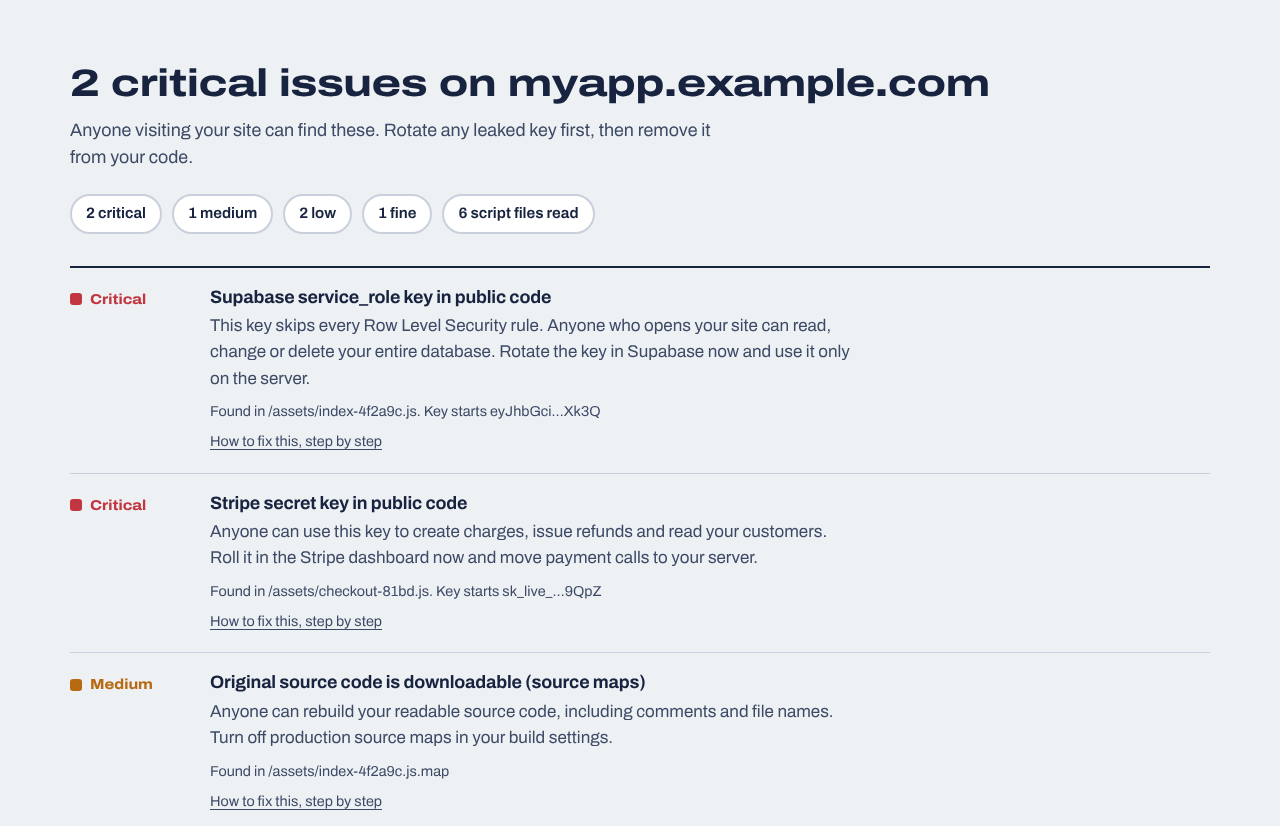
An example result for a made-up app. Severities run from Critical (rotate a key today) to Fine (meant to be public).
Code scanners vs. this check
Many "vibe coding security scanners" read your repository (static analysis) or attack your running app (dynamic testing). Both find things this check can't. This one has a narrower job: show what your deployed app gives to every visitor right now, in 20 seconds, without access to your code. It's the check to run first and after every deploy, not the only one you'll ever need. It doesn't test logins, API routes or database rules.
Use it from your AI agent
Coding agents can run the same check through a public JSON API: GET https://appinspected.com/api/v1/check?url=<address>, documented in our llms.txt and OpenAPI spec. Ask your agent to run it after every deploy and fix anything critical.
Before and after launch
Website security report
$19 one time
For any website you own: a read-only review of up to 30 pages and 40 JavaScript files (found through your build manifest, routes and sitemap), app logic in the browser (admin and paid-feature checks, prices sent from the browser, AI APIs called directly), headers, cookies and CORS, domain and email records, libraries with known vulnerabilities, forgotten files and third-party scripts, with fixes written for your host. Optional database tests for Supabase or Firebase. Requires proof you own the site.
We repeat the outside checks every day and email you when something changes: a new key in your JavaScript, a removed header, a new third-party script, a certificate about to expire. Includes a live badge and one full website report every 30 days.
Making sure an app written mostly by an AI tool doesn't ship the security shortcuts AI tools tend to take: secret keys in the browser, database rules switched off, admin keys used to get past errors, and build files left public.
Are vibe-coded apps secure?
They can be, but they often aren't by default, because the tools optimize for working code. The most common problems are easy to find from outside and fast to fix once you know about them.
Which AI app builders does this work with?
Any of them, because it checks the deployed app rather than the tool: Lovable, Bolt, v0, Replit, Cursor, Windsurf, Claude Code, Firebase Studio and hand-written code alike. It needs a public web address.
How is this different from a code security scanner?
Code scanners read your repository and can find problems in server code that never reaches the browser. This check reads only what your live site serves, so it needs no access to your code and finds what an attacker would find first. They answer different questions; use both if you can.
Should I scan before or after launch?
Both. Before launch, to fix mistakes while nobody is looking. After launch, after every deploy, because each AI-generated change can reintroduce a key or a setting.
Can my AI coding agent run this check?
Yes. Agents can call GET /api/v1/check?url=<address> and get JSON back, with no API key. Instructions are in llms.txt.