Built your app with Lovable, Bolt, v0, Replit or Cursor? Paste its address and see the security mistakes AI tools ship most, the way a stranger would see them. Free, about 20 seconds, no sign-up.
Passive and read-only. Works with any public site, including apps built with Lovable, Bolt, v0, Replit, Cursor, Windsurf and Claude Code.
AppInspected
App
Waiting for your address
Checked
–
Critical issues
–
Not checked yet
Your result fills in this tag. Nothing is stored.
Results
The free check can't see these
They need a deeper look at your database rules or code. The website security report covers more of them.
AI app builders are very good at getting an app working. They are less careful about who else it works for. The same handful of mistakes comes up again and again in apps made with Lovable, Bolt, v0, Replit, Cursor and Claude Code, and almost all of them are visible to anyone who opens the browser's developer tools:
A secret key pasted in to get past an error. The page couldn't read a table, so the AI swapped in the database key that ignores every rule. It worked, so it shipped.
A "hidden" key in an environment variable. Variables starting with VITE_, NEXT_PUBLIC_, REACT_APP_ or EXPO_PUBLIC_ are copied into the JavaScript your visitors download.
AI and payment APIs called straight from the browser. The demo called OpenAI or Stripe from the page; the demo became the product.
Build leftovers. Source maps switched on for debugging, a .env file in the publish folder, a whole project folder deployed with its .git history.
Most of these apps are single-page apps that talk to Supabase or Firebase directly from the browser, so the JavaScript bundle is where the keys live. That's what this check reads.
What we check in your app
Secret keys in your bundle
We read your page, its scripts from your own domain and the code chunks they load (up to 25 files), and look for Stripe, OpenAI, Anthropic, AWS, GitHub, Slack, SendGrid, Resend and Twilio keys, private keys and database URLs with a password.
Supabase keys, decoded
Supabase's legacy keys are tokens with a role inside. We decode them: service_role is critical, anon is fine. New-style sb_secret_ keys are critical, sb_publishable_ keys are fine.
Firebase and Google keys
A Firebase web key is meant to be public, so it's marked fine with a reminder about Firestore rules. A Google API key with no Firebase config around it is flagged so you can check its restrictions.
Exposed files
/.env and /.git/HEAD, flagged only when they return real file contents and not your app's fallback page.
Readable source code
Whether the source map your main bundle points to can be downloaded.
HTTPS and headers
HTTPS, Strict-Transport-Security, Content-Security-Policy, framing protection and X-Content-Type-Options.
It works on any public address: *.lovable.app, *.bolt.host, *.vercel.app, *.netlify.app, *.replit.app, Firebase Hosting and your own domain.
Example result
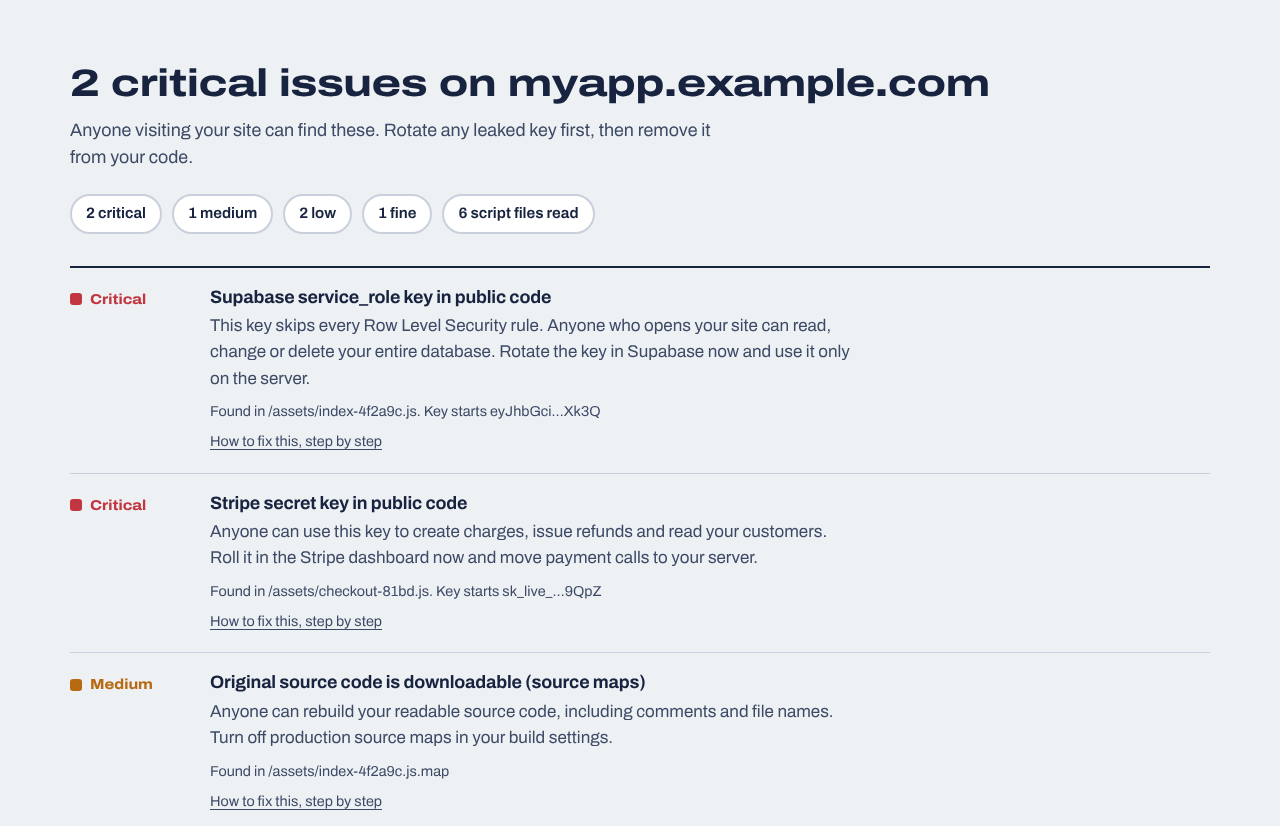
A made-up app with a Supabase service_role key and a Stripe secret key in its JavaScript. Keys are always shown cut short.
Web app security scanners vs. this check
Classic web app security scanners such as OWASP ZAP or Burp Suite are active: they crawl every form and send attack payloads to look for injection and cross-site scripting. They're powerful, but they need setup, create junk data and should only ever be pointed at an app you own, ideally a staging copy.
This check is passive. It reads what your app already sends to every visitor and nothing more, so it's safe to run on a live app in 20 seconds. The trade-off is coverage. It can't tell you:
whether admin or paid features are only hidden in the browser rather than enforced on the server;
anything about mobile app binaries (iOS or Android). It checks web apps only.
The $19 website security report covers the middle two from the outside: it reads up to 40 of your app's JavaScript files for admin and paywall checks that only run in the browser, prices sent from the browser to checkout and AI APIs called directly, and it can add database tests for Supabase or Firebase using your own test accounts.
Whatever needed the secret key (payments, AI requests, admin database access) belongs in a server function: an API route, an Edge Function or a serverless function. Read the key from a server-only environment variable, never one starting with VITE_, NEXT_PUBLIC_, REACT_APP_ or EXPO_PUBLIC_.
AI tools change a lot of code at once, so a key can come back with the next prompt. These plans pick up where the free check stops.
Website security report
$19 one time
For any website you own: a read-only review of up to 30 pages and 40 JavaScript files (found through your build manifest, routes and sitemap), app logic in the browser (admin and paid-feature checks, prices sent from the browser, AI APIs called directly), headers, cookies and CORS, domain and email records, libraries with known vulnerabilities, forgotten files and third-party scripts, with fixes written for your host. Optional database tests for Supabase or Firebase. Requires proof you own the site.
We repeat the outside checks every day and email you when something changes: a new key in your JavaScript, a removed header, a new third-party script, a certificate about to expire. Includes a live badge and one full website report every 30 days.
Nobody can promise that from a single scan. What you can do quickly is rule out the mistakes that cause most real incidents in AI-built apps: secret keys in the browser, open database rules, exposed .env or .git files and public source maps. The check above covers the ones visible from outside; your database rules need a separate look.
Does it work with mobile apps?
It checks web apps: anything with a public web address. It doesn't analyze iOS or Android app files. If your mobile app also has a web version (for example an Expo web build), you can check that.
Will the check slow down or break my app?
No. It makes about as many requests as one visitor loading your page, plus a few small requests for well-known files. It never submits forms or writes data.
My app shows a login screen first. Can you still check it?
Yes. Single-page apps usually ship most of their JavaScript to the login page, so keys in the main bundle are still found. Code that only loads after login may not be read; the website security report follows your build manifest and routes to find code chunks the home page doesn't load.
Lovable and Bolt already have a security scan. Do I need this?
Their scans look at your project from the inside before you publish. This check looks at the published app from the outside, which also catches changes made outside the builder, custom domains and keys added after the scan ran. Use both.
Does it check my API routes?
No. It doesn't call your API or test its login checks. It reports what the browser can see. Testing who can call which endpoint needs access to your code, or an active test with your permission.