API security starts with what you ship to the browser. Paste your site's address and we'll search its page and JavaScript for secret API keys anyone can copy, and tell you which keys are fine to be public.
Passive and read-only. Works with any public site, including apps built with Lovable, Bolt, v0, Replit, Cursor, Windsurf and Claude Code.
AppInspected
Site
Waiting for your address
Checked
–
Critical issues
–
Not checked yet
Your result fills in this tag. Nothing is stored.
Results
The free check can't see these
They need a deeper look at your database rules or code. The website security report covers more of them.
Anything your website sends to the browser is public. That includes every JavaScript file, so a key that's in your code is a key anyone can copy in a few seconds with the browser's developer tools. Automated scanners look for exactly that, all day. Large studies of public websites keep finding hundreds of thousands of live secrets this way.
The usual routes in:
Build-time environment variables. A variable named VITE_OPENAI_KEY or NEXT_PUBLIC_STRIPE_SECRET feels hidden because it lives in .env, but the prefix tells the build tool to copy the value into the browser bundle.
Calling an API straight from the page. The quickest demo of an AI feature calls OpenAI or Anthropic from the browser, key included.
Swapping keys to fix an error. A request was blocked, so the stronger key went in.
"Obfuscated" keys. If the browser can use a key, anyone can extract it. Splitting, encoding or minifying it doesn't help.
Which keys we detect
We read your page and up to 25 JavaScript files from your own domain, including code chunks the main bundle loads, and match each one against the patterns below. Secret keys belong on a server; publishable keys are designed for the browser.
Keys the exposed API key checker looks for
Key
Looks like
Severity
Stripe secret or restricted key (live)
sk_live_, rk_live_
Critical
Stripe secret key (test mode)
sk_test_, rk_test_
High
OpenAI API key
sk-proj- and older sk- keys
Critical
Anthropic API key
sk-ant-api…, sk-ant-admin…
Critical
AWS access key ID
AKIA…, ASIA…
Critical
GitHub token
ghp_, gho_, ghs_, github_pat_
Critical
SendGrid and Resend keys
SG., re_
Critical
Supabase service_role or secret key
a token with role service_role, sb_secret_
Critical
Private key
-----BEGIN … PRIVATE KEY-----
Critical
Database URL with password
postgres://user:pass@…, mysql://, mongodb://
Critical
Slack token, Twilio API key
xoxb-, xoxp-, SK + 32 hex
High
Secret-named value
a random value in clientSecret, secretKey, privateKey…
High
Google API key (no Firebase config)
AIza…
Medium: restrict it
Stripe publishable, Supabase anon or publishable, Firebase web key
pk_, role anon, sb_publishable_, AIza…
Fine: meant to be public
Example result
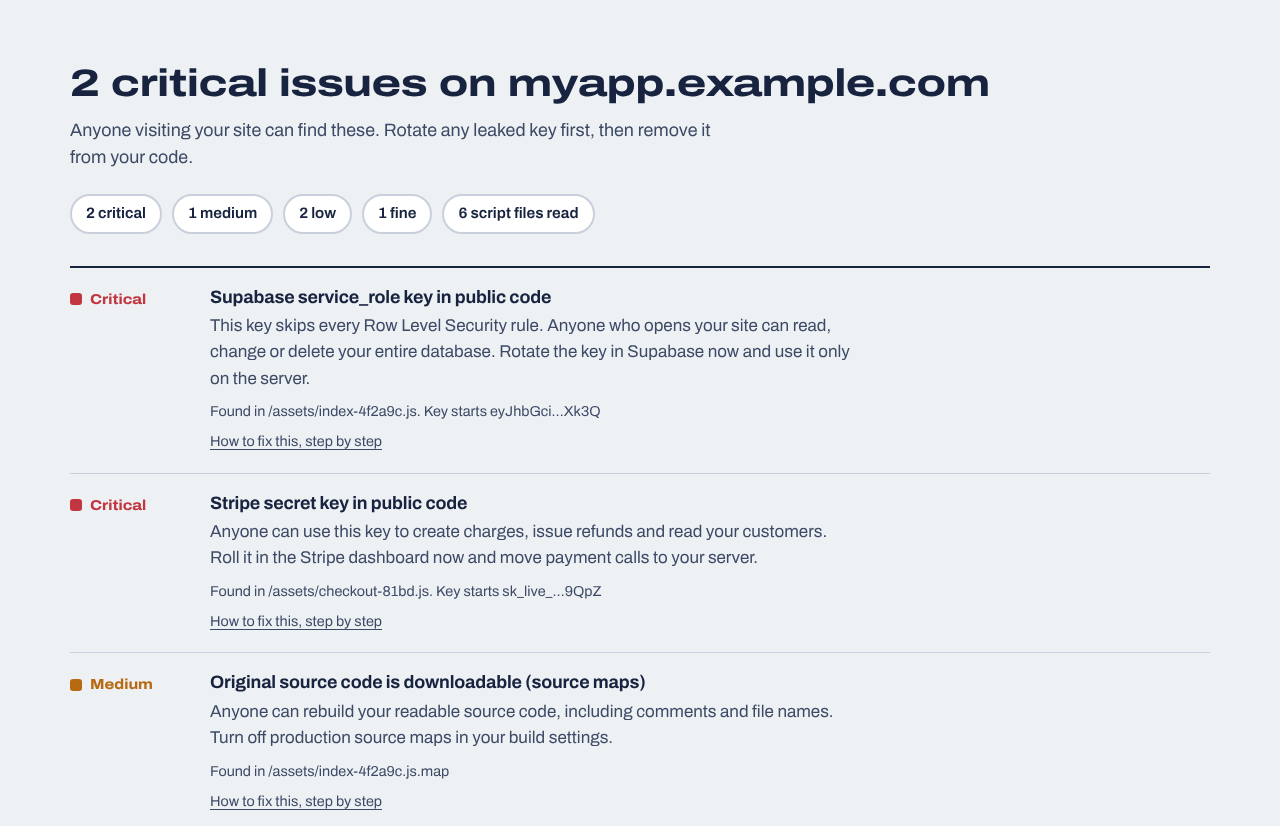
Two secret keys found in a made-up app's JavaScript. We show only the start and end of each key and the file it was in.
How we handle the keys we find
We show at most the first 8 and last 4 characters of a key, so you can recognise it without the result becoming a leak of its own.
We never use a key, test it against the provider or store it. That also means we can't tell you whether a key is still active: treat every match as live until you've checked in the provider's dashboard.
Results aren't saved. Close the tab and they're gone.
What this API security check doesn't do
"API security" covers a lot. This page covers one part of it: secrets your frontend gives away. It doesn't test your API itself. In particular, it doesn't:
call your API endpoints, check their authentication or rate limits, or look for broken object-level authorization (one user reading another's records);
scan your Git repository or its history (keys that were committed but never deployed);
read scripts served from other domains, such as a CDN or a third-party widget.
For endpoint testing, the OWASP API Security Top 10 is the place to start, and you'll need either access to your code or an active test you've authorized. The $19 website security report goes deeper on the frontend side: it reads up to 40 scripts across up to 30 pages, flags AI APIs called directly from the browser and secret-named public environment variables, and checks CORS.
Found a key? Do this, in this order
Rotate it now
Create a new key in the provider's dashboard and revoke the old one. Removing the key from your code doesn't help on its own: it's in browser caches, archives and anyone's downloads already.
Move the call behind your server
Add a small server endpoint (an API route, a Supabase Edge Function, a Cloudflare Worker) that holds the key in a server-only environment variable and calls the provider for the browser.
Protect that endpoint
Require a logged-in user and rate-limit it. Otherwise you've built a free proxy for whoever finds it.
Cap the damage
Set a hard monthly spend limit for AI providers and check usage and logs for activity you don't recognise.
Check again
Deploy and run this check again to confirm the key is gone from every script.
Keys tend to come back: the next AI prompt, a new feature, a teammate's quick fix. Monitoring scans every new JavaScript file on your site every day and emails you if a secret appears.
Website security report
$19 one time
For any website you own: a read-only review of up to 30 pages and 40 JavaScript files (found through your build manifest, routes and sitemap), app logic in the browser (admin and paid-feature checks, prices sent from the browser, AI APIs called directly), headers, cookies and CORS, domain and email records, libraries with known vulnerabilities, forgotten files and third-party scripts, with fixes written for your host. Optional database tests for Supabase or Firebase. Requires proof you own the site.
We repeat the outside checks every day and email you when something changes: a new key in your JavaScript, a removed header, a new third-party script, a certificate about to expire. Includes a live badge and one full website report every 30 days.
Open your site, open the browser's developer tools and search the loaded JavaScript (Sources or Network tab) for the start of your key, such as sk_live_ or sk-proj-. The check above does that across your page and its scripts in one go and tells you which keys are secret and which are publishable.
Is it safe to put an API key in frontend JavaScript?
Only if the key is designed to be public: Stripe publishable keys, Supabase anon or publishable keys, Firebase web config. Secret keys that can spend money or read private data must stay on a server.
Are Supabase and Firebase keys supposed to be public?
Their browser keys are. The Supabase anon or publishable key and the Firebase web API key are meant to be in your frontend, but they're only safe when Row Level Security or Firestore and Storage rules are set up correctly. The Supabase service_role and sb_secret_ keys are never meant for the browser.
Can I hide an API key with environment variables in React or Vite?
Not in the browser. Vite copies variables starting with VITE_ into the bundle, Next.js does the same with NEXT_PUBLIC_, and Create React App with REACT_APP_. Environment variables only hide a key when they are read by server code.
Does this check test my API for vulnerabilities?
No. It finds secrets your frontend exposes. It doesn't call your endpoints or test authentication, rate limits or authorization. That needs access to your code or an authorized active test.
Do you store or use the keys you find?
No. Keys are cut short before they're shown, results aren't stored, and we never send a found key to any provider.
I already removed the key from my code. Am I safe?
Not until you rotate it. Old versions of your JavaScript stay in caches and archives, and automated scanners may have copied the key within minutes of it going live.