Firebase security check: is your web app's data really protected?
Paste the address of any web app that uses Firebase. We read its JavaScript the way a stranger would, separate the Firebase web key that's meant to be public from the secrets that aren't, and show you what to check in your Security Rules. Free, about 20 seconds, no sign-up.
Passive and read-only. Works with any public site, including apps built with Lovable, Bolt, v0, Replit, Cursor, Windsurf and Claude Code.
AppInspected
App
Waiting for your address
Checked
–
Critical issues
–
Not checked yet
Your result fills in this tag. Nothing is stored.
Results
The free check can't see these
They need a deeper look at your database rules or code. The website security report covers more of them.
A Firebase web app talks to Cloud Firestore, Realtime Database and Cloud Storage straight from the browser. To do that it ships a config object (API key, project ID, auth domain) inside your JavaScript, where anyone can read it. Firebase designs it that way:
The web API key isn't a secret. Firebase's documentation says API keys for Firebase services are OK to include in code, and that the keys Firebase creates are automatically restricted to Firebase-related APIs.
Security Rules decide who gets the data. Firebase says access to Firestore, Realtime Database and Storage is controlled by Security Rules, not by keeping the key secret. If the rules are open, Firebase warns that anyone who guesses your project ID can steal, change or delete your data.
So a Firebase security check has two halves. What your live app gives away (secrets that don't belong in the browser, exposed files) is visible from outside, and our free check tests it. Whether your rules hold is decided inside your project, so it needs your rules file or a test with real accounts. This page covers both.
What the free check looks for in a Firebase app
Firebase web key: fine
A Google API key (it starts with AIza) next to a Firebase config is marked Fine, with a reminder that your rules must deny public access. You don't need to rotate it. The same key without any Firebase config is flagged for review, because it may be a Maps or Cloud key that needs restricting: see Google API key in your website code.
Which Firebase project your app exposes
The project ID in your config is public, so a stranger knows which database to try. The check's agent API lists every Firebase project ID your public code references (backendRefs), which tells you whose rules to review, including old projects you forgot about.
Private keys: critical
A service account key (the JSON file with a -----BEGIN PRIVATE KEY----- block) gives admin access that skips Security Rules. If one is in your JavaScript, we flag it as critical.
Other secrets near your Firebase code
OpenAI, Anthropic, Stripe, SendGrid, Resend and other secret keys that belong in a Cloud Function or another server, not in the page.
Exposed files and source maps
/.env, /.git/HEAD and downloadable source maps, which can reveal secrets and your original code.
HTTPS and security headers
HSTS, Content-Security-Policy, framing protection and X-Content-Type-Options, whether you host on Firebase Hosting or anywhere else.
We read your page plus up to 25 JavaScript files from your own domain, including the code chunks they load. The check is passive: it never sends a request to Firestore, Realtime Database, Storage or Firebase Authentication, and never uses a key it finds. Keys in the result are cut down to their first and last few characters.
Example result
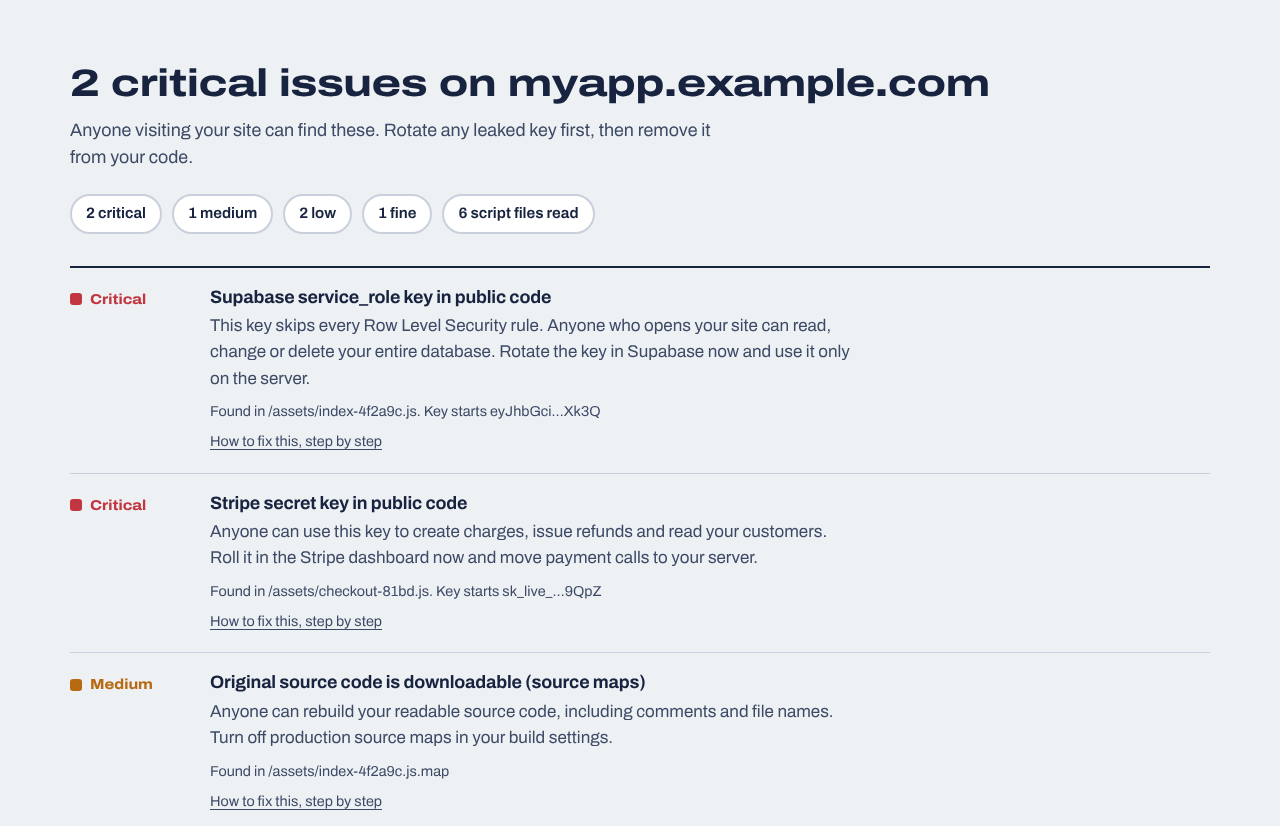
A made-up app with two secret keys in its JavaScript. In a Firebase app, the web key shows up as Fine and secrets like these as critical. Each finding links to the fix.
How to check your Security Rules
A clean free check means no secret is leaking from your site. It can't see your rules. Three ways to check them, from quickest to most thorough:
Read the rules for open patterns
In the Firebase console, open the Rules tab for Firestore, Realtime Database and Storage (or the rules files in your project if you deploy with the Firebase CLI). Firebase's docs single out three patterns: allow read, write: if true (open to everyone), a rule that only checks a date (test mode, open until then), and request.auth != null on its own, which lets any signed-in user, including one who just made an account, read and write everything it covers. Step by step: Firestore test mode rules.
Write owner-only rules
For data that belongs to a user, compare the signed-in user with an owner field on the document, for example request.auth.uid == resource.data.ownerId, and check the new document on create and update. Firebase's docs call this the content-owner pattern.
Test as a stranger and as a second user
Use the Rules Playground in the console, or the Firebase Local Emulator Suite for automated tests. Try a signed-out read, a read of your own document and a read of another user's. If the stranger or the other user gets in, a rule is too wide.
The $19 website security report can do this for you. After you prove you own the site, it reads your app the same way as the free check but much further (up to 30 pages and 40 scripts), and adds an optional Firebase section with three parts:
Rules review: paste your firestore.rules and storage.rules, and we point out open rules, test-mode date rules and "any signed-in user" rules, line by line, with the fix.
Emulator tests: we generate a small test script that you run on your computer against the official Firestore emulator. It tests reads and writes as a signed-out visitor and as two users without ever touching your real project.
Live read-only tests: you create two test accounts and a synthetic test document in up to three collections, and we check whether a signed-out visitor or the other account can read it. We only ask for the test document's marker field, and never write to your project.
Firebase keys and Gemini
The Firebase web key is public by design, so watch which APIs it can call. Firebase's documentation says never to add the Gemini Developer API to the allowed APIs of a publicly accessible key, and never to put a Gemini API key in your code. If your app calls Gemini from the browser, use Firebase AI Logic, which Firebase App Check can protect, or move the call to a server. App Check helps block requests that don't come from your real app, but Firebase describes it as preventing some, not all, abuse, so it works alongside your rules rather than replacing them.
If the check finds a secret
Replace the leaked key
For a service account key, open Google Cloud console → IAM & Admin → Service Accounts, create a new key for the server that needs it, then delete the leaked one. For any other provider, create a new key in its dashboard and turn the old one off. Guides: Stripe secret key exposed, OpenAI API key in your frontend.
Move the work to a server
Whatever needed the secret goes into a Cloud Function or your own backend, with the key in server-side config, never in a VITE_, NEXT_PUBLIC_ or REACT_APP_ variable. Code that uses the Firebase Admin SDK bypasses Security Rules, which is exactly why its credentials must stay on the server.
Check your data, then run the check again
Look for documents, users or files you don't recognize, then paste your address above to confirm the secret is gone.
Or ask your AI tool to do it
Paste this into Lovable, Bolt, Cursor, Firebase Studio or whichever tool built your app. Review what it changes before you deploy.
Do a Firebase security review of this app and report back before changing anything. 1) List every key and credential in frontend code or in VITE_/NEXT_PUBLIC_/REACT_APP_ variables. The Firebase web config (apiKey, projectId, authDomain) is fine in the browser; anything else secret, especially a service account private key or a Gemini, OpenAI or Stripe secret key, must move to a Cloud Function or server and be read from server-side config. 2) Show my Firestore, Realtime Database and Storage security rules and point out any rule that allows access with if true, only checks a date, or only checks request.auth != null. 3) Propose rules that deny everything by default and let a signed-in user read, create, update and delete only documents whose owner field equals request.auth.uid, with public data read-only. Make sure the app writes the owner field on every document it creates. 4) Write Firebase emulator tests for a signed-out user, the owner and a second user. Then fix the items I approve, one at a time.
After launch
Website security report
$19 one time
For any website you own: a read-only review of up to 30 pages and 40 JavaScript files (found through your build manifest, routes and sitemap), app logic in the browser (admin and paid-feature checks, prices sent from the browser, AI APIs called directly), headers, cookies and CORS, domain and email records, libraries with known vulnerabilities, forgotten files and third-party scripts, with fixes written for your host. Optional database tests for Supabase or Firebase. Requires proof you own the site.
We repeat the outside checks every day and email you when something changes, such as a new secret in your JavaScript, a removed header or a certificate about to expire. Includes a live badge and one full website report every 30 days.
Is it safe that my Firebase API key is visible in my app?
Yes, for the web key in your Firebase config. Firebase says API keys for Firebase services are OK to include in code and restricts the keys it creates to Firebase-related APIs. What protects your data is your Security Rules. Don't add the Gemini API to a public key, and keep any service account key off the browser.
Can someone read my Firestore database with just my config?
Only if your rules let them. With open or test-mode rules, Firebase warns that anyone who guesses your project ID can read, change or delete your data. With owner-only rules, the config alone gets a stranger nothing.
My test-mode rules have an expiry date. Am I safe until then?
No. Until the date passes, anyone can read and write everything those rules cover; after it passes, your own app stops working. See Firestore test mode rules.
Is request.auth != null enough?
Usually not. It lets any signed-in user read and write everything the rule covers, and anyone can usually create an account. Check that the signed-in user owns the document as well.
Can this check test my Security Rules?
The free check can't: it never contacts your Firebase project. Read your rules for the patterns above, or add the optional Firebase tests to the website security report: a rules review, emulator tests you run locally, and read-only tests with two test accounts you create.
Does App Check replace Security Rules?
No. App Check helps make sure requests come from your real app, but Firebase says it prevents some, not all, abuse. Someone using your app normally still gets whatever your rules allow.
Does it work with apps built by AI tools?
Yes. It checks the deployed app, so it works on a web.app or firebaseapp.com address, Vercel, Netlify or your own domain, whichever tool wrote the code. Using Supabase instead? See the Supabase security check.